Thursday, October 29, 2026יום ה׳ פר׳ וירא, י״ח חשון תשפ״ז

Know your hours.
Get paid for every one.

The work tracker for writers, editors and typesetters – with Hebrew dates, Yom Tov and Maaser built in.

For Windows 10 and 11. No card needed for the trial.
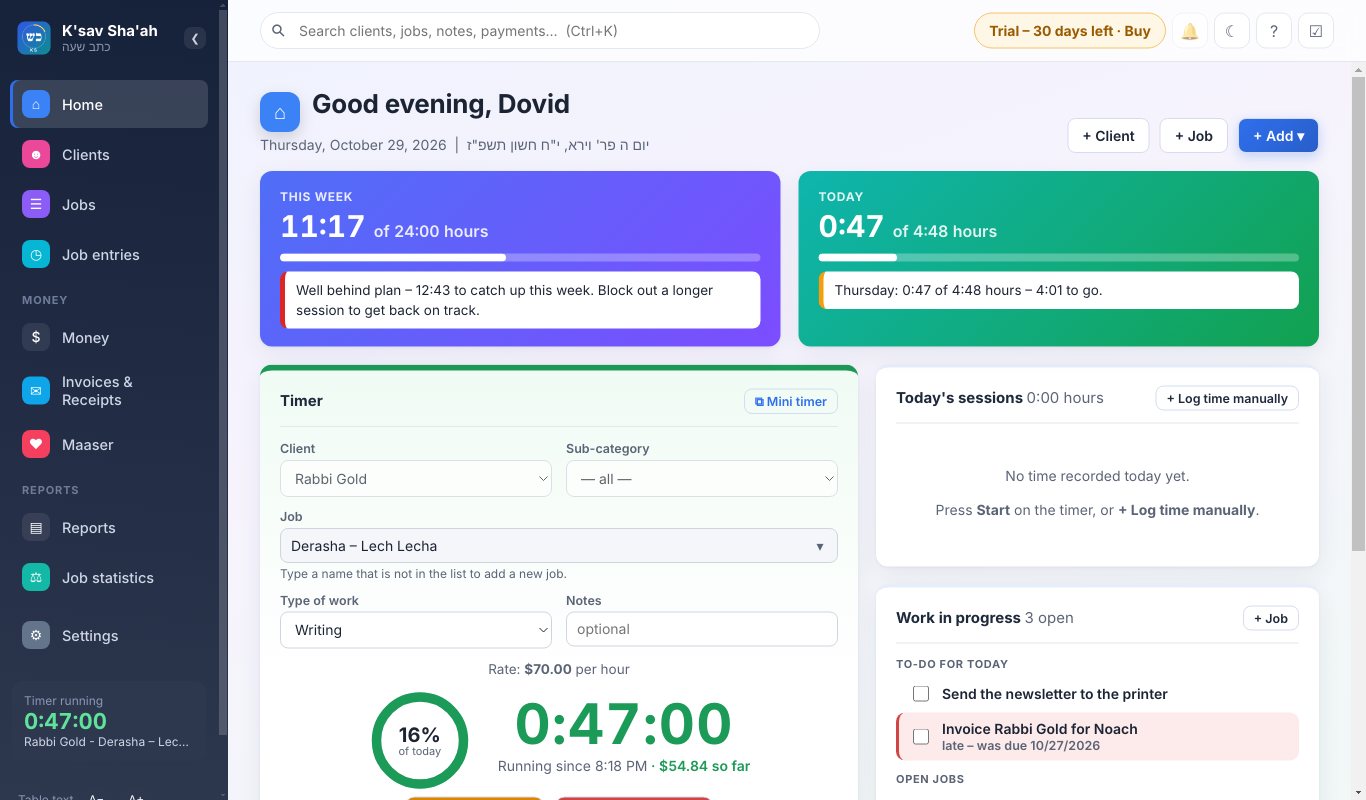
The K'sav Sha'ah home screen: hours this week and today, the running timer, and open jobs
Parsha and Yom Tov to 2100 Israel or outside Israel English · עברית · אידיש Your data stays on your computer
Features

Everything a freelance writer needs, in one place

From the moment you start a job until the payment comes in and the Maaser is set aside.

One-click timer

Start and stop with one click. A small timer stays on top of Word or InDesign while you work, in the size you like.

A Jewish calendar that counts right

Yom Tov days are not counted against your hours. You choose how Erev Yom Tov, Chol Hamoed, Chanukah, Purim and fast days are counted.

Clients and jobs

Every client with their own rates, job types and steps. Tag any job and see later how long that kind of work really took.

Invoices, receipts and quotes

Design them once with your own logo and wording. Make a PDF in one click. Turn an accepted quote into a job.

Maaser worked out

Figured from what you were actually paid, with every step of the sum shown, so you can check it.

Reports

Week, month and year at a glance, job statistics by client or tag, and export to Excel for your accountant.

Reminders and a to-do list

A reminder when it is time to start or stop work, and a to-do list beside you. Late jobs show on the home page.

Bring in your Excel sheet

Already keeping hours in Excel? K'sav Sha'ah reads your workbook and brings in your clients, jobs and hours.

A closer look

Made for the way you work

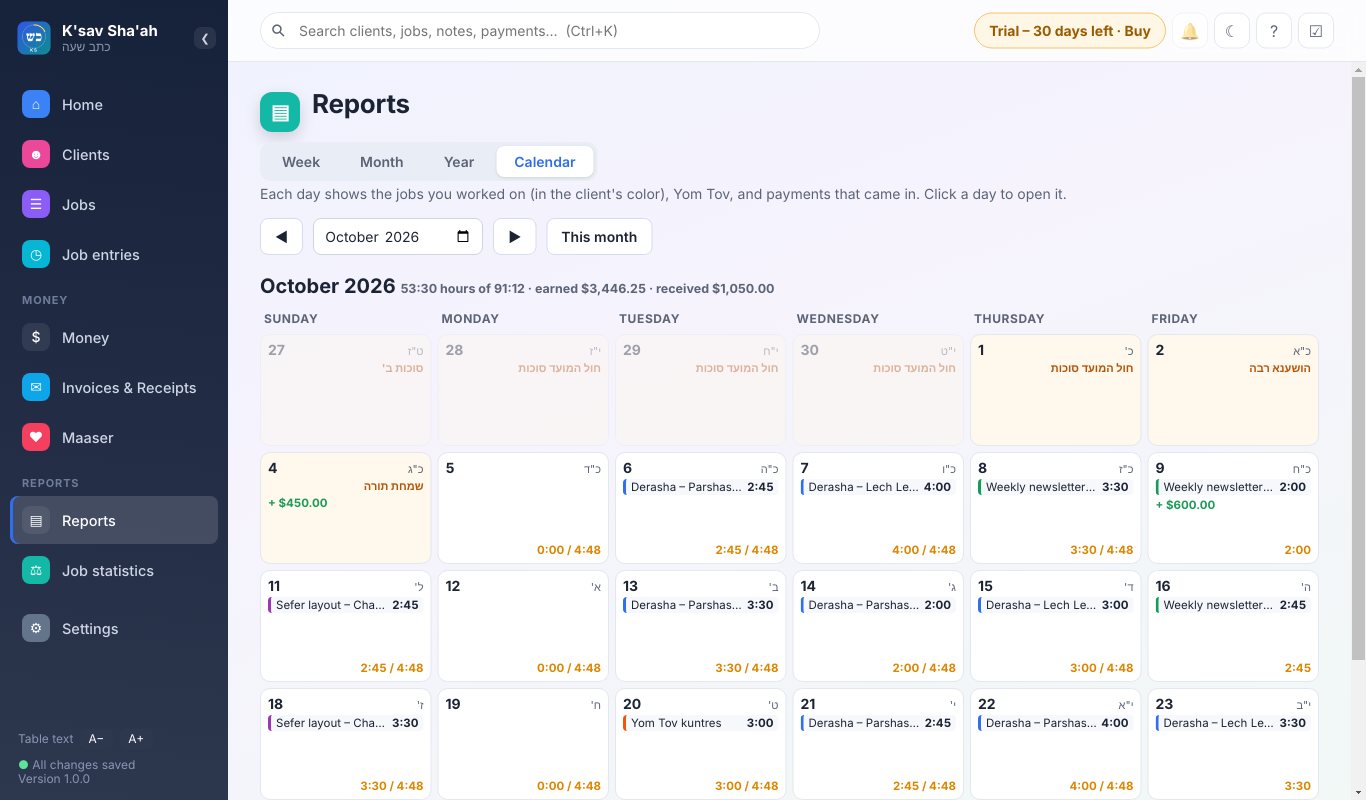
Calendar month with parsha names and Yom Tov days marked
Calendar. Each day shows the parsha, Yom Tov and the hours you worked against the hours you planned.
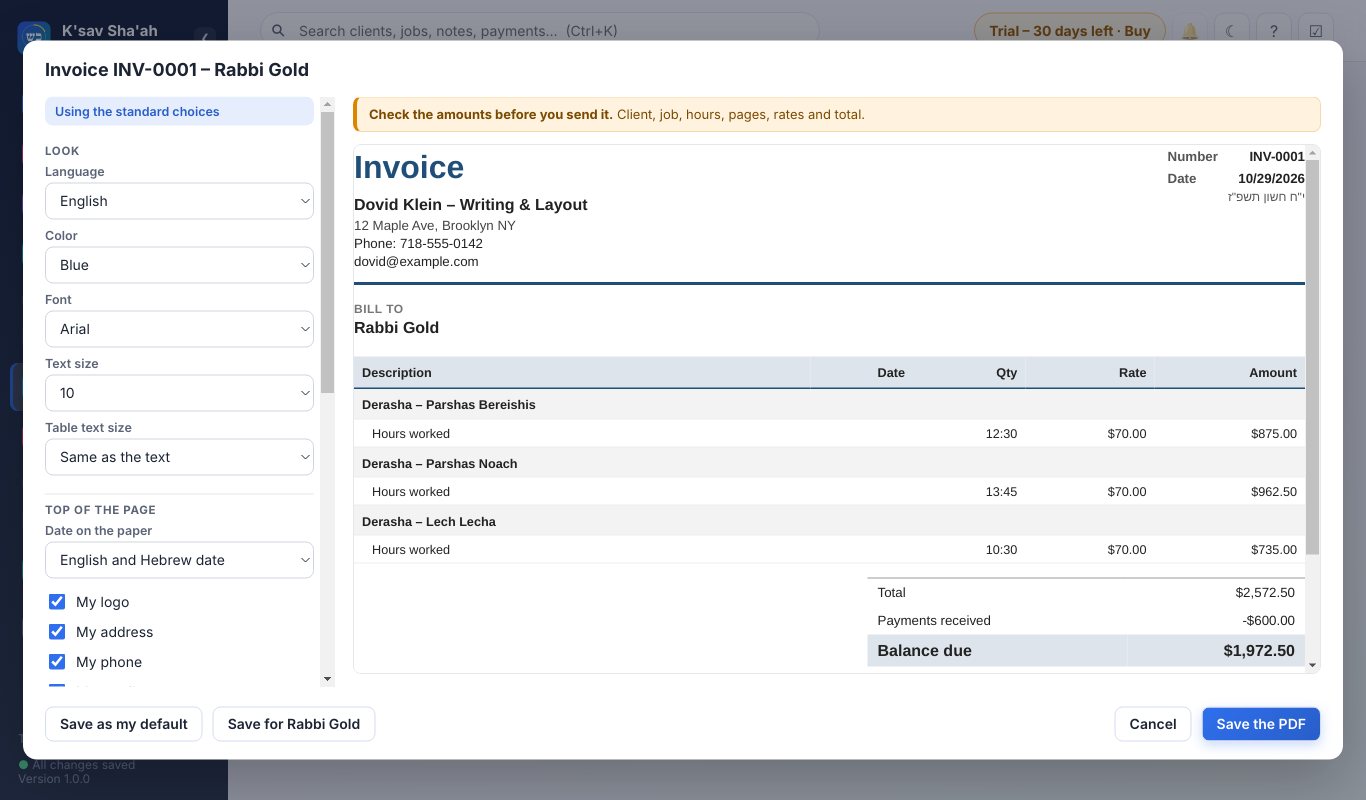
Invoice designer with a live preview of the invoice
Invoice designer. Choose what shows, move it around, and see the invoice change as you go.
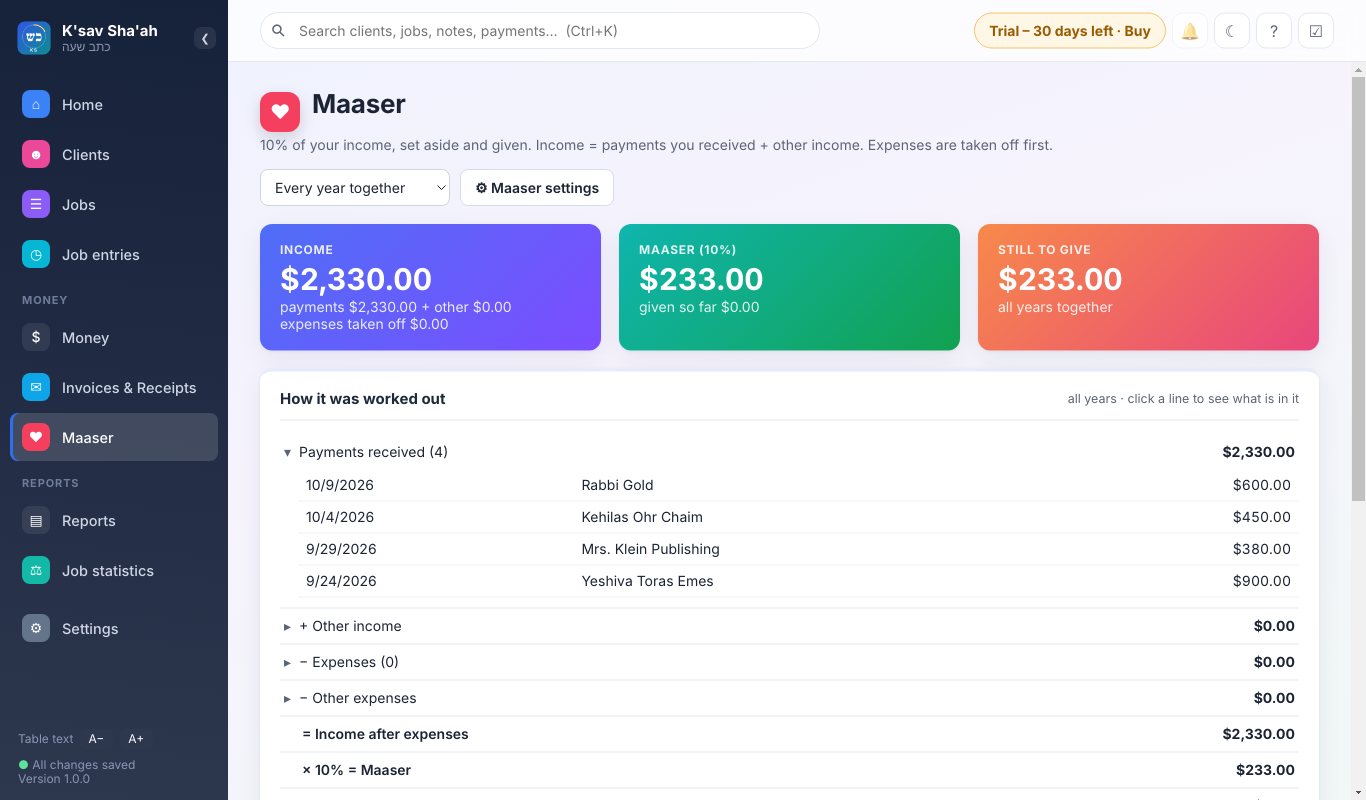
Maaser page showing income, Maaser due and given
Maaser. What came in, what is due, what you gave, and how it was worked out.
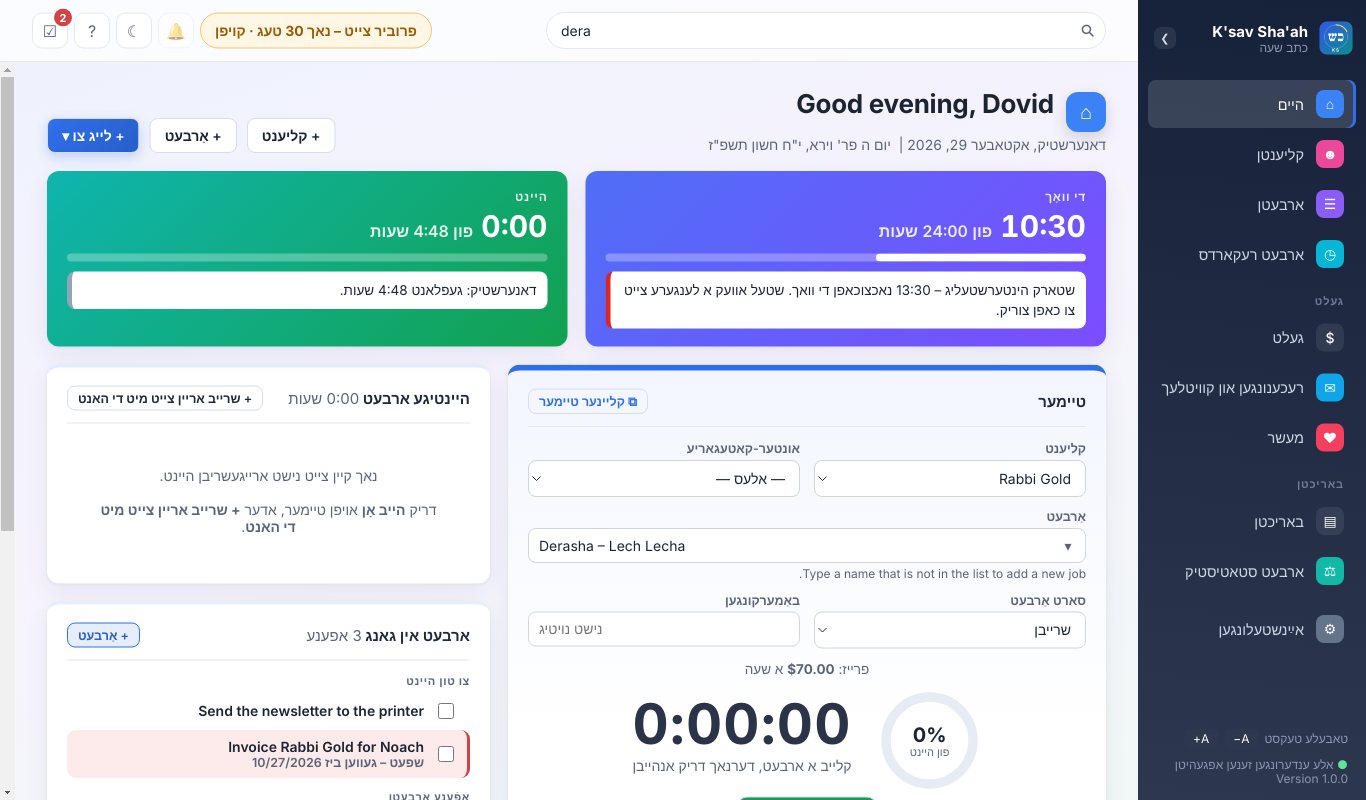
The program shown in Yiddish, right to left
Your language. Switch the whole program to Hebrew or Yiddish, right to left, and back again.
Your data

Your work stays yours

On your own computer

Your clients, hours and invoices are saved on your computer, not on someone else's server. It works without internet.

Backed up for you

Choose a Google Drive, Dropbox or OneDrive folder and K'sav Sha'ah keeps a copy there each day you work.

Nothing is lost by mistake

Nothing is ever deleted. A wrong entry is set aside as void, so your records always add up.

Price

Try everything free for 30 days

Every feature is open during the trial. When you are ready, buy a license and enter the key. Your work carries on as it was.

Introductory price
[INTRO PRICE] first year

Then [YOUR PRICE] a year.

  • All features, all updates during the year
  • One license per computer
  • Help by email
Buy a license
More than one computer

Working on a desktop and a laptop, or buying for an office? Tell us how many computers before you buy and we will send a key for each one.

Write to sales@ksavshaah.com

Questions

Good to know

What happens after the 30 days?

The program asks for a license key. Nothing you entered is lost. Once you enter the key, everything opens again just as you left it.

Does it work on a Mac?

Not yet. K'sav Sha'ah is made for Windows 10 and 11.

Can I use it in Israel?

Yes. On first start you choose Israel or outside Israel, and the Yom Tov days and parshios follow your choice.

Does it show money in shekels?

Amounts are shown in dollars.

I got a new computer. What do I do?

Copy your backup to the new computer and write to us for a key for it.

Start counting every hour today

Download K'sav Sha'ah and use everything free for 30 days. A user guide with pictures comes with it. Read the guide (PDF)

Download for Windows
Questions or a problem? support@ksavshaah.com